Spending, budgets and net worth in one place. See where the money goes and roughly what you own. Private, no account.
Browse a demo with sample data →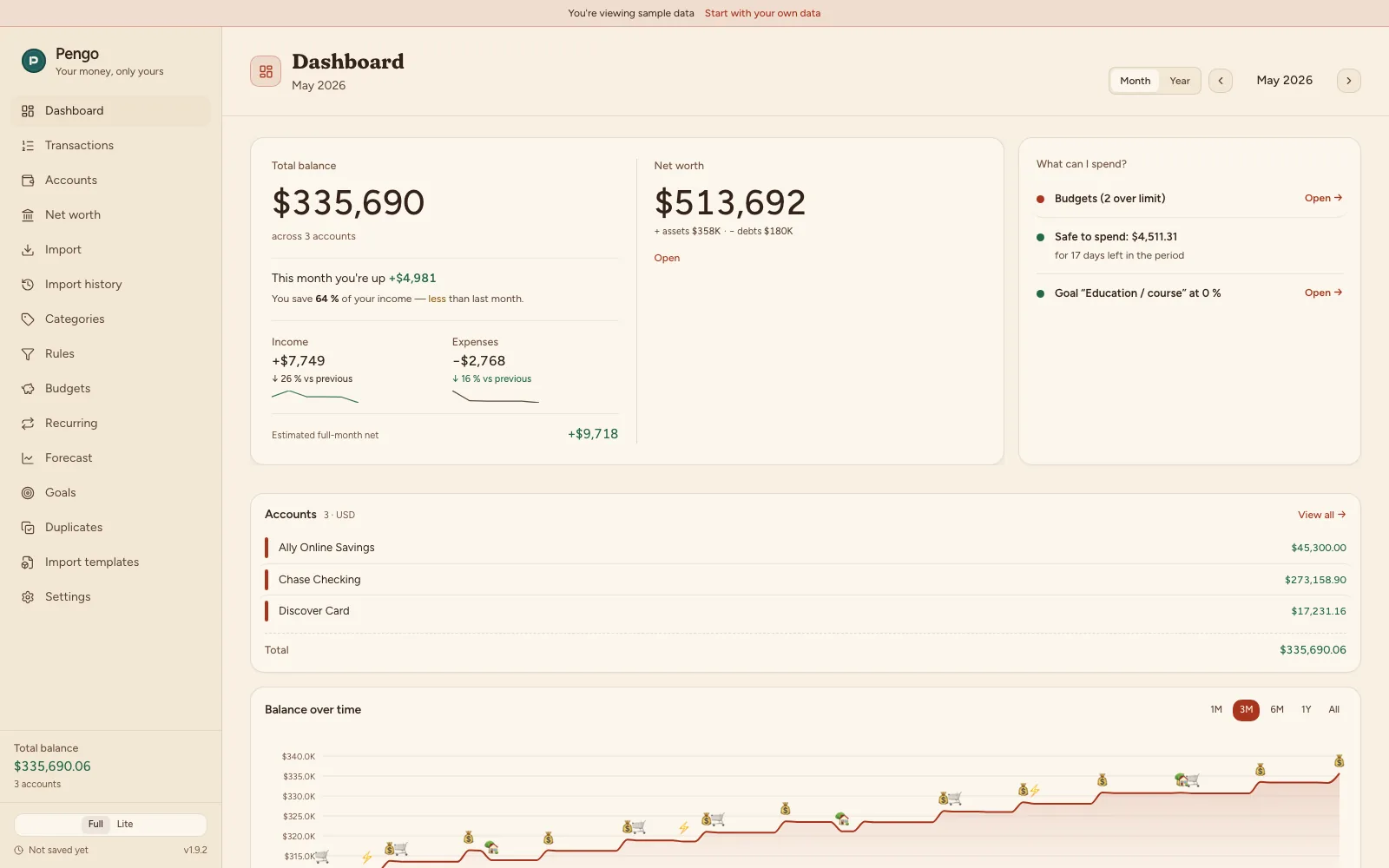
Most finance apps send your transactions to someone else's servers. Pengo is deliberately the opposite: your history stays exactly where it belongs.
Works completely without internet. Data is computed and stored right on your device. Nothing gets sent anywhere, not even "to improve the service."
No accounts, no analytics, no server. We have no way of seeing how much you spend, and that's the whole point. None of your financial data is with us; we only ever learn your name and email if you buy Plus, and only for the license and our bookkeeping.
The database is locked with AES-256. Only you know the password. Without it, the data is unreadable even to someone with access to your disk.
No connecting to your bank through third-party middlemen. You download the statement yourself and Pengo processes it locally.
From your online banking, download a statement as CSV, OFX, or GPC. Every Czech bank supports this.
Drop the file into the app window. Pengo recognizes your bank's format, maps the columns, and filters out duplicates on the spot.
Transactions sort themselves into categories. You instantly get charts, budgets, and a forecast for how the month will end.
Half a flat, gold at home, bitcoin in a wallet, a mortgage still running. Add them next to your accounts for an estimated net worth in one place.
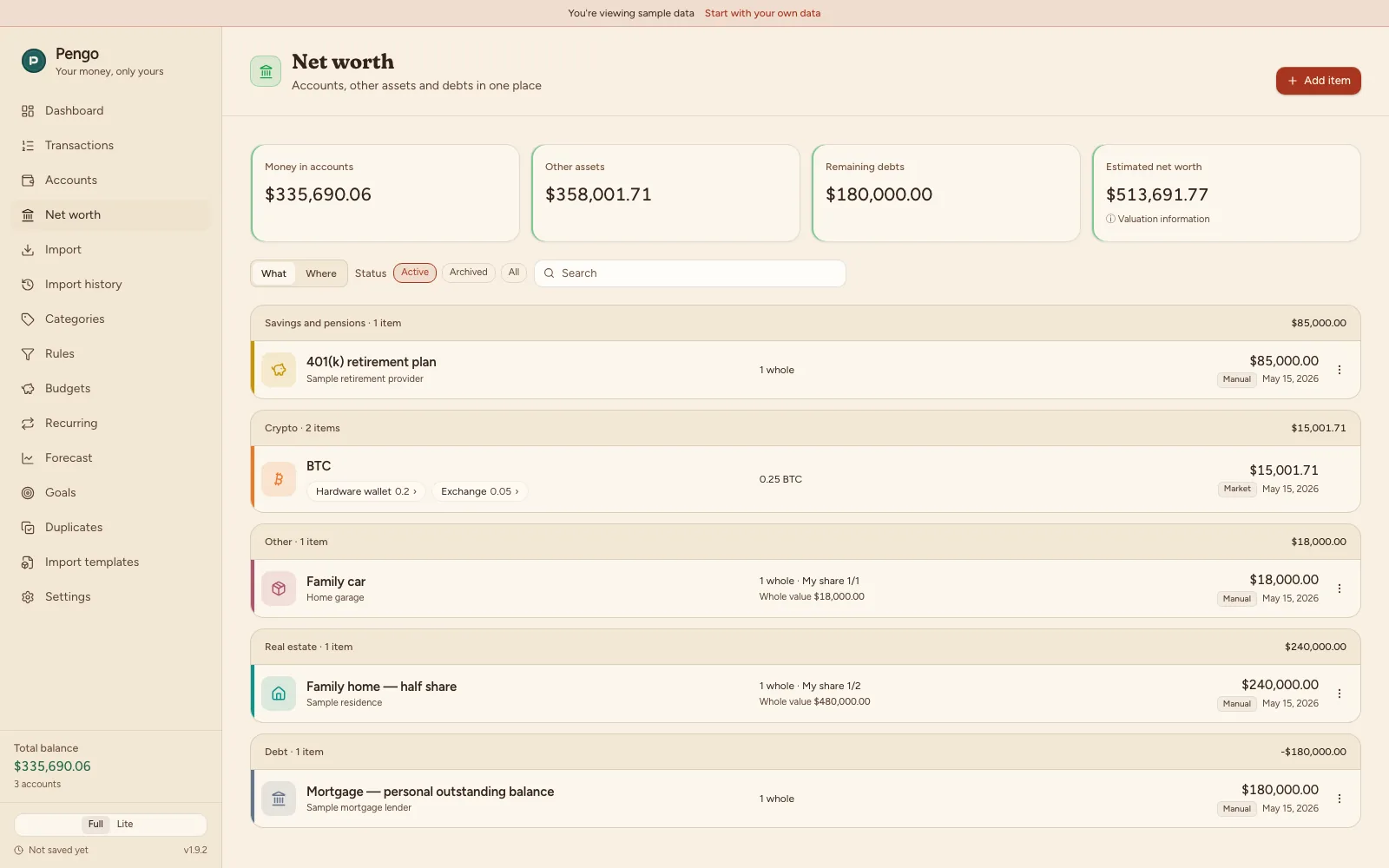
A co-owned flat or car counts only your share.
A value chart from its valuations, plus net worth over time on the Dashboard (Plus).
With Pengo Plus, once switched on in Settings: indicative prices for supported coins and the available history, at most two years back.
Browsing and editing are free, you'll need Pengo Plus to add your own items.
Everything is computed locally from your own statements. No annoying notifications, no upsell nagging at every turn.
Drag in a CSV or OFX statement from any bank. Unknown format? Pengo walks you through matching the columns once and remembers the template.
CSV · OFX · GPCWhat you own beyond bank accounts: real estate, metals, crypto, securities, savings, and receivables, minus debts. An estimated net worth in one place.
Ownership share · valuation historyBased on the merchant and your history, Pengo suggests a category on its own. Set up rules once and they apply forever.
Rules · localCategory limits that follow your rhythm: monthly, weekly, every two weeks, or payday to payday. Pengo shows spending as you go and warns you before you hit the cap.
Month · week · 2 weeks · paydayFrom your recurring income and payments, Pengo estimates where you'll end up by month's end. No surprises on your balance.
End of monthA three-paycheck emergency fund, a vacation, a new laptop. Set a target amount and Pengo shows how close you're getting.
SavingsImported the same statement twice? Pengo spots the duplicates and offers to merge them. Your numbers stay clean.
Auto-detectPengo finds your rent, utilities, subscriptions, and salary on its own and tracks their rhythm. See what's due in the next 7 days, counted into the forecast too.
Auto-detected · next 7 daysPrivacy that doesn't rest on a company's promise, but on how the app is built.
Underneath, there's no made-up format: a plain SQLite database locked with standard encryption (AES-256). No black box, no vendor lock-in.
Get your transactions as CSV anytime. And with one click, a complete backup of everything as a file that's yours to keep.
The app and the data both live on your device. Even if we shut down, your copy keeps running and nobody can take it away.
Open Pengo, drop in your first statement, and get a full picture in two minutes. Free, no account, no commitment.
Browse a demo with sample data → Pengo
Pengo